

Listening Post › Widgets
Listening Post includes a macOS desktop widget that shows the last track you heard.
What it shows
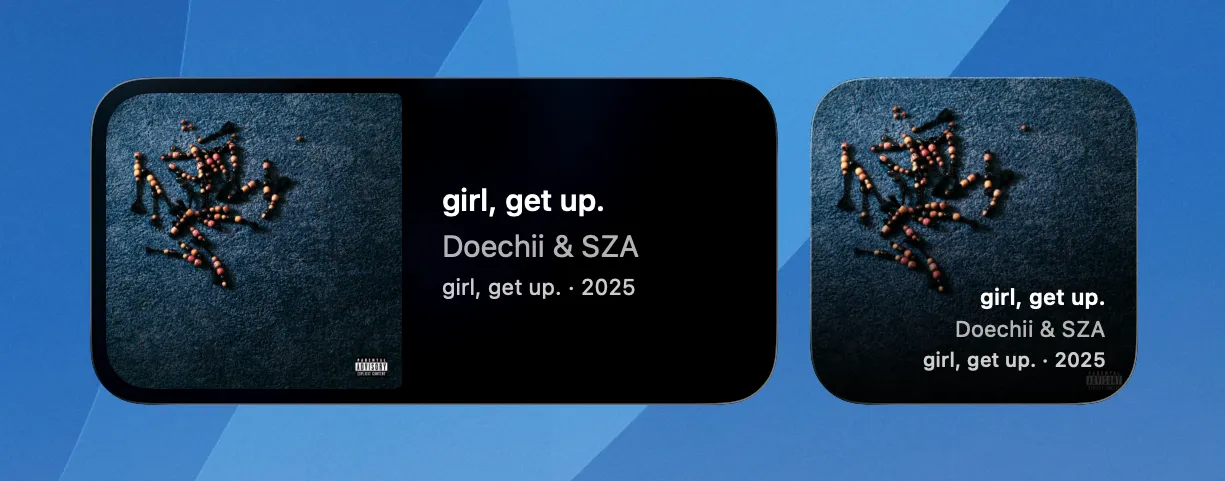
Section titled “What it shows”Track title, artist, release year, and album artwork. Two sizes:
- Small fills the widget with artwork, track info overlaid at the bottom.
- Medium puts artwork on the left, track info on the right.
If no track has been recognized yet, the widget shows a placeholder.
When it updates
Section titled “When it updates”The widget updates each time a new track is recognized and its metadata has been fetched from external services (Spotify, Deezer, etc.). No polling, no scheduled refresh. If the app isn't running, the widget keeps showing whatever it last knew about.
After about 15 minutes with no new recognition, the widget dims and replaces the release year with an elapsed time label ("Heard 15 min ago", "Heard 2 hr ago").
Click behavior
Section titled “Click behavior”Configurable in Settings → Widgets. You can have clicks open the track in Apple Music, Spotify, Last.fm, ListenBrainz, or Deezer. Only services you've enabled as channels appear in the list.
"Do nothing" is the default. If you pick a service but it doesn't have the track (no match or enrichment failed), clicking does nothing either.