Listening Post › History Window
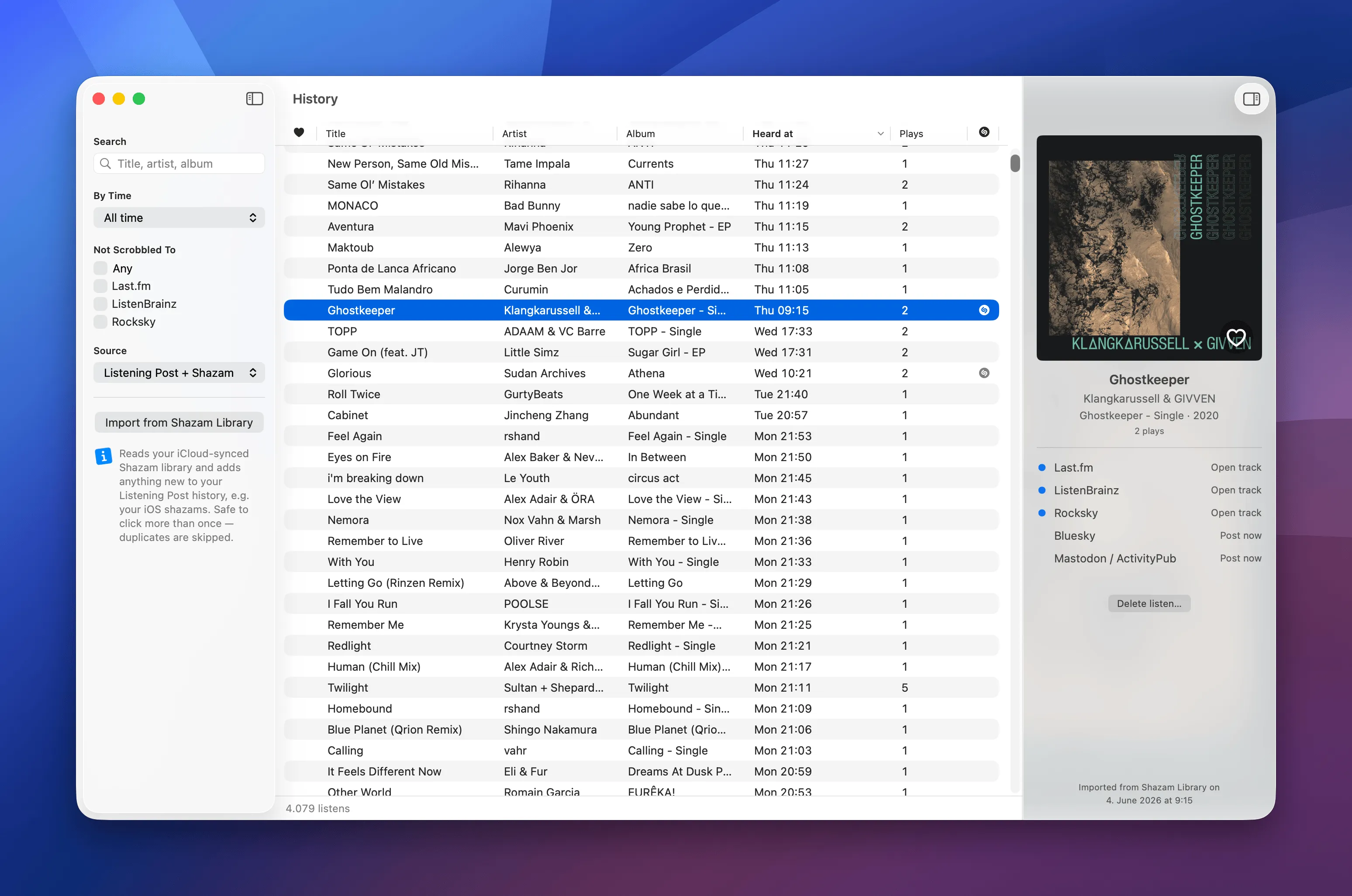
The History window holds every track Listening Post has ever heard. It's split into three parts: the sidebar on the left for searching and filtering, the track list in the middle, and the inspector on the right for the track you've selected.
The track list
Section titled “The track list”Each row carries a track's liked status (the heart), title, artist, album, a timestamp, and a play count. Tracks that came in from your iCloud Shazam library carry a small Shazam badge on the right. These columns are read-only; the heart is only an indicator. To like or unlike a track, use the heart button that's overlaid the inspector's album cover.
Click a column header to sort by it, and click the same header again to flip between ascending and descending order.
What the list counts depends on what you sort by:
- Sorted by time (the default, Heard at, newest first), every listen is its own row. A song you've heard five times shows up five times, each at the moment you heard it, and the footer counts listens.
- Sorted by Plays, the list collapses to one row per track, ranked by play count. A row now stands for all of a track's plays, so the time column renames to Last heard at and shows the most recent one, and the footer counts tracks.
Searching and filtering
Section titled “Searching and filtering”The sidebar narrows down what the list shows:
- Search matches title, artist, or album as you type.
- By Time limits the list to a period: Today, This week, Last week, This month, Last month, This year, or All time.
- Not Scrobbled To filters to tracks that haven't reached a given scrobbler yet, so you can spot the gaps.
- Source picks where listens come from: Listening Post + Shazam (both), Listening Post only (your Mac's mic), or Shazam only (the shazams synced in from your other devices).
Importing your Shazam library
Section titled “Importing your Shazam library”Import from Shazam Library pulls your existing iCloud Shazam history into Listening Post, and it's where you set up the ongoing sync. Clicking it opens a dialog with two switches:
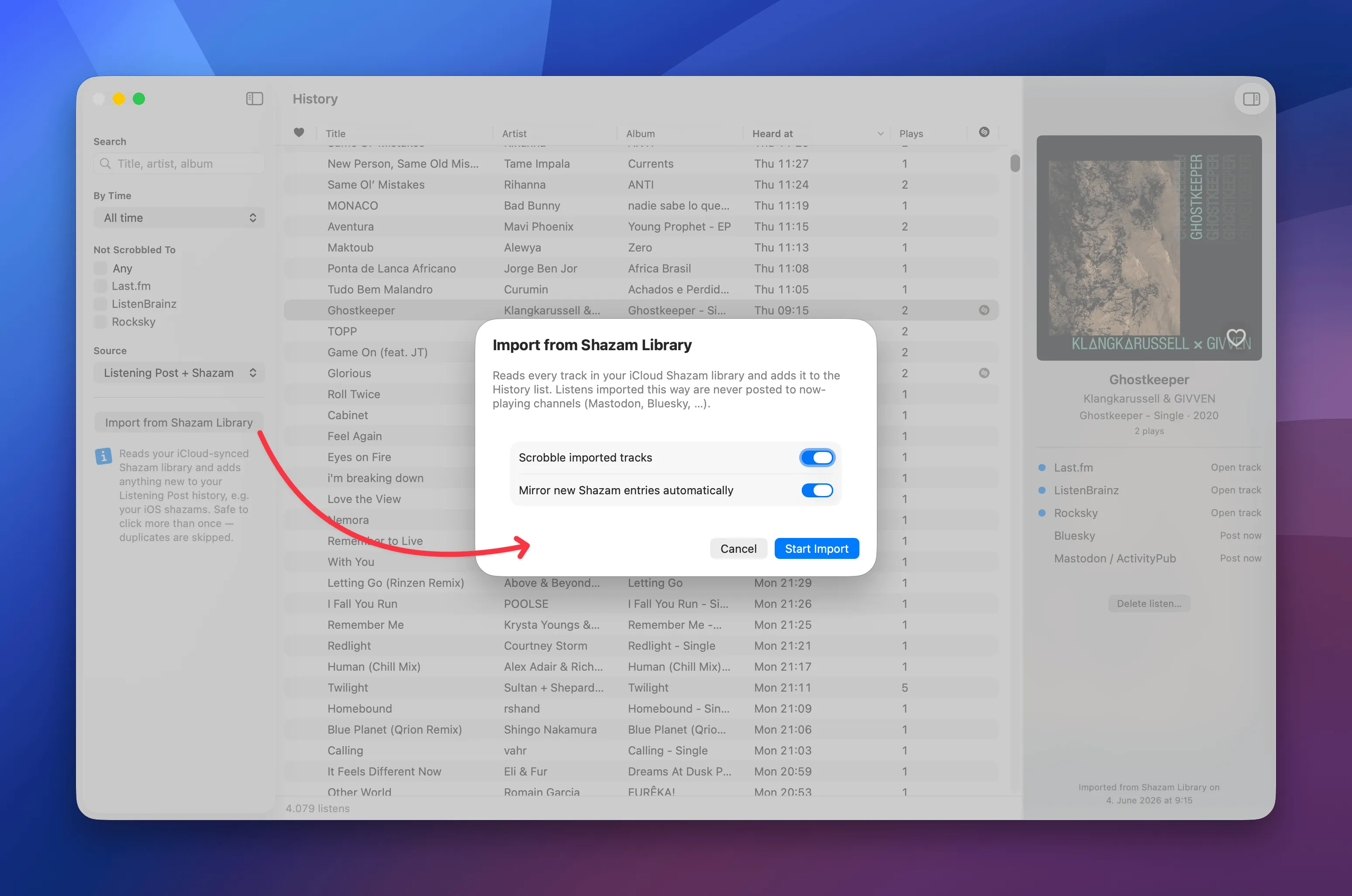
- Scrobble imported tracks — whether imported listens are scrobbled to your channels, or just added to the history without sending them anywhere.
- Mirror new Shazam entries automatically — keep watching iCloud and pull in new shazams as they land, instead of only importing what's already there.
Tracks imported this way are never posted to your now-playing social channels (Mastodon, Bluesky, and so on); only tracks recognized live get posted there. The import is safe to run again whenever you like, since duplicates are skipped.
The inspector
Section titled “The inspector”Select a track and the inspector shows its artwork, title, artist, album, year, and play count.
The heart on the artwork is a toggle: click to like the track, click again to unlike. A like here reaches any enabled channel that supports it, just like the global track actions in the menu bar.
Underneath, each channel shows a status dot and an action. A filled dot means the track already reached that channel, and Open track opens it there. An empty dot means it hasn't been sent yet; for social channels you get Post now to post it on demand. The inspector keeps to opening and posting; the copy-link actions from the menu bar's track menu aren't here.
Delete listen… removes the selected listen. For imported tracks, the inspector also notes when they came in from your Shazam library.